 LinITX Blog Ubiquiti & MikroTik Wireless Networking Experts

In the world of networking with all the standards, it is far too often we get calls with people confused about PoE or wondering why something is not powering on by PoE.
Before we go any further into the different types of PoE it’s important to understand the terms used in a PoE system. A PoE system consist of two components:
- PSE – Power Sourcing Equipment – eg. a switch or PoE injector
- PD – Powered Device – eg a wireless access point or a VoIP Phone
Also PoE can be delivered as either Endspan or Midspan
- Endspan – The power comes directly from the switch (the PSE) at the end of the cable.
- Midspan – The power is “injected” somewhere along the cable using a PoE injector.
Unfortunately along with the 802.3 standards for active PoE there is also vendor specific passive PoE which is not standard which also gets called PoE just to make it all very confusing! Both Ubiquiti and MikroTik use 24v passive PoE.
PoE falls into two categories: “Active PoE” and “Passive PoE”.
Active PoE
Active PoE is an IEEE 802.3 standard of either 802.3af, 802.3at and 802.3bt.
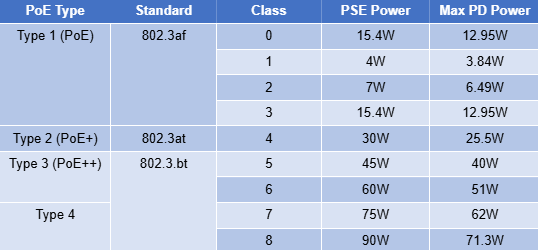
IEEE 802.3af – PoE – PSE Class 0-3, provides up to 15.4W to PDs.
IEEE 802.3at – PoE+ – PSE Class 4, provides up to 30W to PDs. Backward compatible with PoE.
IEEE 802.3bt – PoE++ – PSE Class 6 provides up to 60W to PDs.
IEEE 802.3bt – Type 4 Higher power PoE – PSE class 8 provides up to 90W to PDs.
WIth active PoE a handshake occurs between the switch delivering the PoE power and the device which is being powered by PoE before the power is turned on by the switch, this makes sure that a device that does not need power gets power which might inadvertently damage it. The main difference between the versions of PoE in the 802.3 standard is the max current each can deliver which can be seen in the table below.
Active PoE is backwards compatible so a switch port that delivers PoE++ (802.3bt) will power without damaging an older PoE (802.11af) device. However, in reverse connecting a unit that needs the higher wattage of 802.3bt which is then connected to a switch port which is 802.3af, the devices will not get damaged as the voltages remain the same, however the device will not be able to function correctly as there is not enough power so either it will power on but not use all the radios or it will not power on at all.
Passive PoE
Passive PoE however is a different ball game altogether. Passive PoE has no standard and can be any voltage. Passive PoE is most commonly used at either 24v or 48v. Passive PoE is also always on which means connecting something to a Passive PoE switch port or a Passive PoE injector means if incorrectly used the equipment can be damaged, either because it was a device not expecting PoE or it was a device which needed 24v but 48v was delivered instead. Passive PoE is delivered across specific pairs of the ethernet cable and again there is no standard for which pairs are used or for that matter how many pairs are used.
2 pair passive PoE, this is most commonly used with only 24v PoE and used on a number of both MikroTik and Ubiquiti devices though a few newer devices use 48v.
2 pair passive PoE can either be Mode A or Mode B.
Passive 2 wire PoE Mode A – This uses the same pins as are used for data in a 10/100Mbps ethernet cable (Pins 1,2,3 and 6) to deliver the PoE and this is normally delivered only as Endspan. Mode A is the least common type of Passive PoE.
Passive 2 wire PoE Mode B – With mode B the power is delivered over the spare pairs in a 10/100Mbps ethernet cable (Pins 4&5 +ve and Pins 7&8 -ve) This has been used by both Ubiquiti and MikroTik for many years. Be also aware that though Passive 2 wire PoE can be used on 1Gbps cables – some PoE inline injectors only passthrough data on pins 1,2,3 and 6 and disconnect the other pairs so only will support 10/100Mbps connections.
As devices have become more power hungry 2 pairs were not enough to deliver the power needed without significant voltage drop so using 4 pairs for passive PoE supports higher wattage often up to 60w. 4 pair passive PoE from Ubiquiti uses all the 4 pairs of the ethernet cable (Pins 1,2,4,5 +ve and Pins 3,6,7,8 -ve)
| Feature | 2-Pair Passive | 4-Pair Passive |
| Common Voltage | 24V | 24V / 48V / 54V |
| Max Power | ~12W – 15W | 30W – 60W+ |
| Data Speed | Usually 10/100 (1 Gigabit possible) | Usually Gigabit |
| Ubiquiti Example | NanoStation Loco AC | airFiber 5XHD, LTU Rocket |
| MikroTik Example | hEX PoE, SXTsq | PowerBox Pro, NetMetal |
The golden rule of Passive PoE. ALWAYS CHECK THE LABLES!
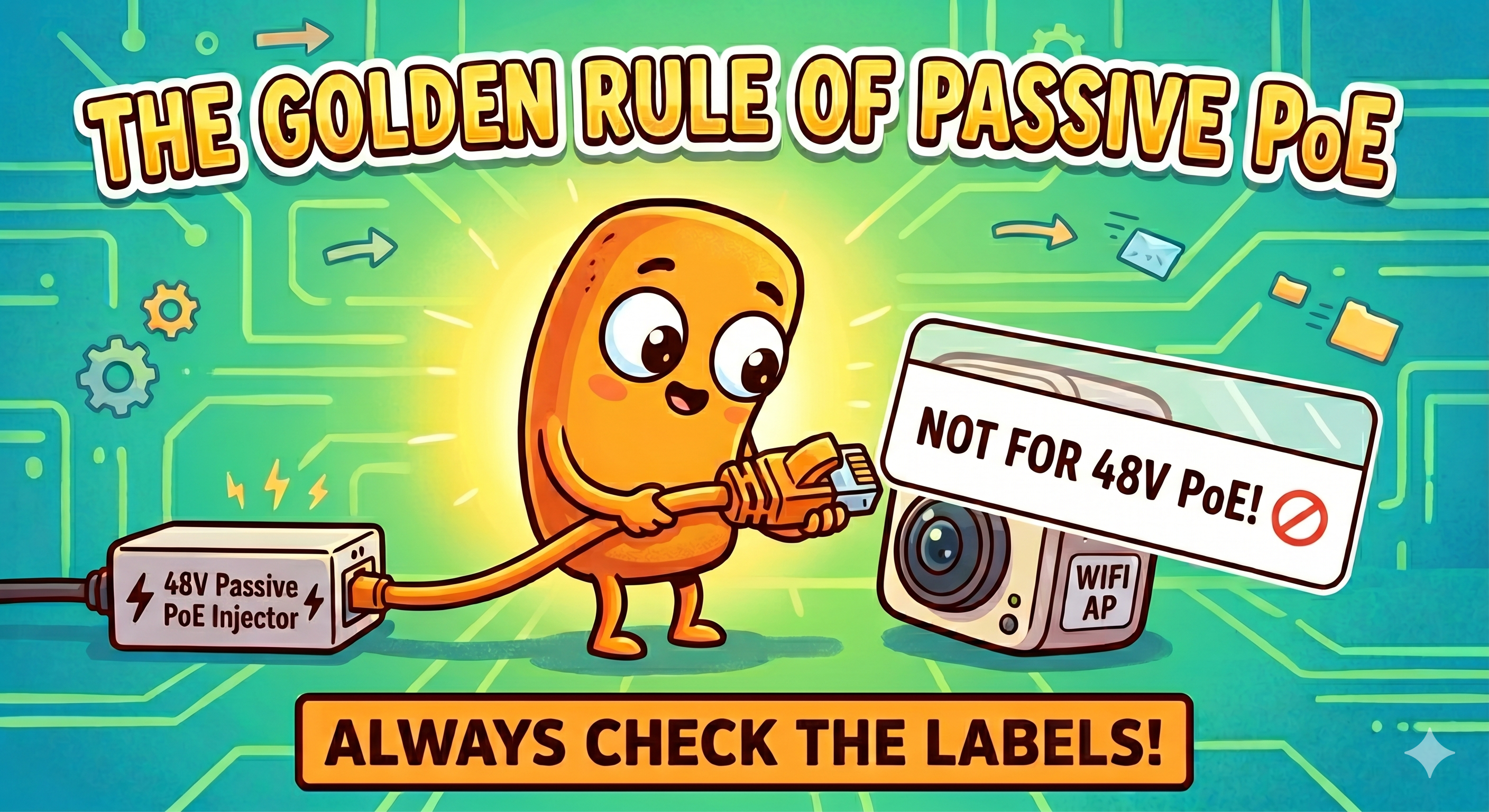
As passive PoE is not a standard, using passive PoE of the incorrect voltage will damage the equipment. Also connecting laptops and other equipment which is not PoE powered can also get damaged.
If you have a device that specifies it needs 4 pair passive PoE, it might still run on 2 pair passive PoE if the wattage is low enough however is quite likely to lose Gigabit connectivity.. Also using a 4 pair PoE injector on a piece of equipment that is designed for only 2 pair, shouldn’t normally damage it as long as the voltage is the same, however if there is not the correct projection inside the equipment applying voltage on pins where it is not expected can terminally damage the equipment.
To further add to the PoE minefield almost all PoE injectors that are marked for 802.3at/af/bt PoE types though are delivering the standard PoE and will power anything that needs that type of power, these are passive devices and the power is always present as they do not carry out the handshake of active PoE, even though the marking on these devices often lead people to believe they are active PoE devices.

So to sum this all up….
- If you connect a device that needs passive 24v to a power source which is passive 48v then its game over!
- Is it 2 wire or 4 wire, this is likely to only affect the power the unit needs so the device may be under powered.
- Check injectors when using 1Gbps connections.
- Don’t plug none PoE devices into Passive PoE midspan injectors
What type of PoE do I have or what type of PoE do I need? There is only one way to find out… read the documentation!
If you are unsure which injector is needed then feel free to contact our sales team for advice. Call us on 01449 888000 or email sales@linitx.com